


 @silentz6
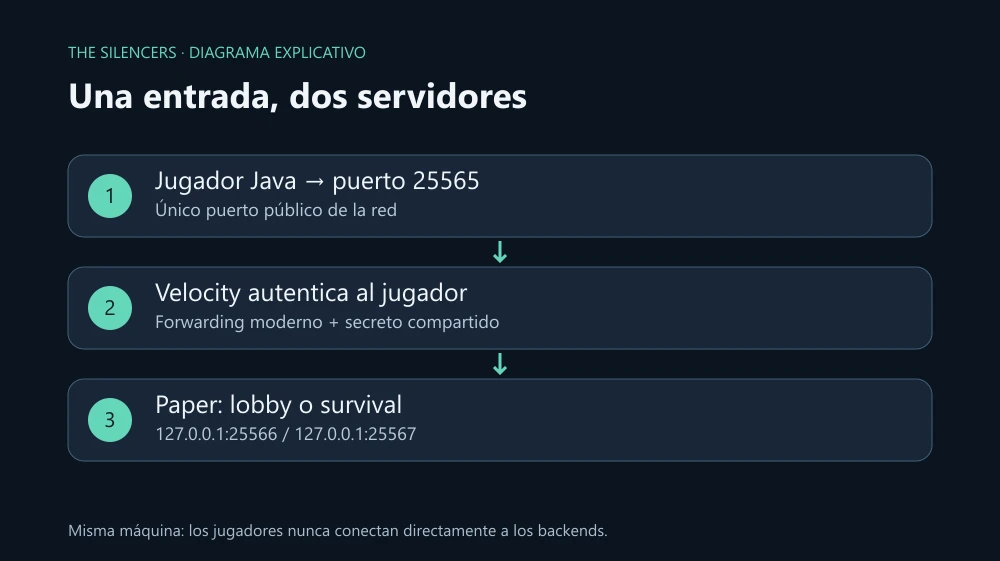
Let's connect a lobby and a survival behind Velocity. The player enters through one address and switches servers without leaving the network. The example places all three processes on the same machine: it is a small topology that lets you understand what should be public and what should remain private.
Last review: October 2, 2026. Reference consulted: the official download offers Velocity 4.2.1-SNAPSHOT; the current documentation requires Java 25. It is a development build, not a stable version that we should label as such. The files were checked against the documentation; a Minecraft network was not run during this review.
Prepare the three processes
You need two Paper servers that already start and a valid Java account. Use the same Minecraft version on both when starting. For Paper 26.1 or later, the documentation recommends Java 25; the 1.20–1.21.11 branch uses Java 21. Check java -version in the terminal that will start each process.
Create separate folders proxy, lobby and survival. Download Velocity from PaperMC, save the JAR in proxy and rename it velocity.jar. Run there:
java -Xms512M -Xmx1G -jar velocity.jarWhen it finishes generating velocity.toml and forwarding.secret, type end in the proxy console. The memory sizes are a starting point for this lab, not a guarantee for a network with hundreds of players.
Configure the route
Modify these keys in the generated velocity.toml while keeping the rest of the file. The first four belong to the root level: place them before the TOML tables, not inside [servers].
bind = "0.0.0.0:25565"
online-mode = true
player-info-forwarding-mode = "modern"
forwarding-secret-file = "forwarding.secret"

[servers]
lobby = "127.0.0.1:25566"
survival = "127.0.0.1:25567"
try = ["lobby"]
try determines where the player initially enters. The proxy performs authentication; the backends receive their identity through modern forwarding. That format requires Minecraft 1.13 or later: this recipe does not work for a network of 1.8 clients.
In lobby/server.properties, change the existing lines:
server-ip=127.0.0.1
server-port=25566
online-mode=false
In survival apply the same with server-port=25567. Offline mode is limited to these private backends; the proxy keeps online-mode=true. Do not open those two ports on the router. If they are in containers or on different machines, localhost no longer represents the backend: use a private network and rules that allow only the proxy before continuing.
Make Paper recognize the proxy
In each config/paper-global.yml, merge this block with the existing one. Replace the placeholder with the exact content of proxy/forwarding.secret and keep it private:
proxies:
  velocity:
    enabled: true
    online-mode: true
    secret: "PEGA_AQUI_EL_SECRETO_GENERADO"
In spigot.yml, settings.bungeecord must remain in false. Do not combine legacy and modern forwarding. Paper 1.18.2 or earlier uses other keys in paper.yml; do not copy this block there expecting the same result.
Check the network
Restart both Paper servers and then Velocity. Connect Minecraft to localhost:25565 from that machine. You should appear in lobby and be able to enter survival with /server survival, if your account is allowed to use that proxy command. Also test /server lobby.
From another machine, direct access to the backends should fail. That test verifies isolation; entering correctly through the proxy does not by itself prove that the private ports are protected.
If a forwarding error appears, compare the secrets and confirm that you restarted Paper after editing the YAML. If the proxy rejects the connection to survival, check the port and that the process is running. If UUIDs or skins change when switching servers, check the three online-mode settings and that BungeeCord forwarding is not still active.
Before adding network plugins, keep a copy of the working configuration and record the proxy build number. That way you can distinguish a connection error from one introduced by a plugin.
Sources and documentation
Project and developer: Velocity, PaperMC team. Official download: PaperMC. License: GPL-3.0 in the Velocity repository. Paper belongs to the same team and is obtained from its download page; its components have licenses documented in the repository. This post distributes the explanation and original diagram by The Silencers, without attaching third-party JARs.
Official Velocity logo: image linked from the PaperMC site. Image source. The banner and explanatory diagram are original by The Silencers.


Comments 0
Join the conversation with your account.
Sign inLoading comments…