


 @the-silencers0
Let's create a task API with JavaScript and Node.js native modules. You can list tasks and create a new one by sending JSON. The goal is to understand the HTTP contract and validation before adding a framework, users, or a database.
Last reviewed: October 2, 2026. Tested with: Node.js 24.15.0, the version available in this environment. The 24 branch is listed as LTS in the official schedule. No npm packages are needed. Tasks live in memory and disappear on restart; the server listens only on localhost.
Define the contract
The API will have two operations: GET /tasks responds with an array and POST /tasks accepts an object with title. A title must contain between 1 and 120 characters after trimming spaces. Creating returns 201, and errors return an object with error.
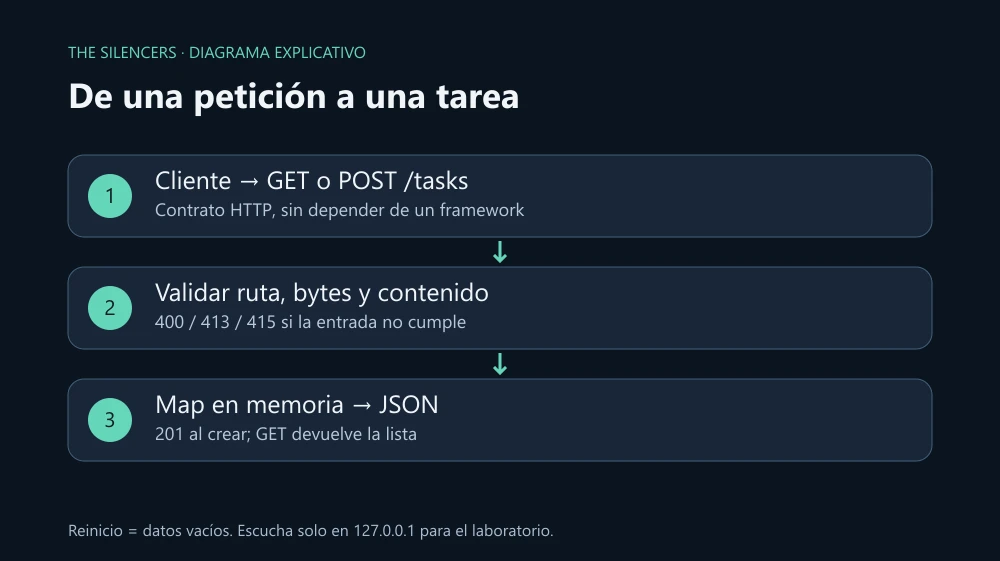
Create an empty folder and save the following as server.mjs. The extension allows using imports without adding type: module to a package.json.
import { createServer } from 'node:http';
import { randomUUID } from 'node:crypto';

const tasks = new Map();
const send = (res, status, data) => {
  res.writeHead(status, { 'Content-Type': 'application/json; charset=utf-8' });
  res.end(JSON.stringify(data));
};

async function readJson(req) {
  const chunks = [];
  let size = 0;
  for await (const chunk of req) {
    size += chunk.length;
    if (size > 8192) {
      throw Object.assign(new Error('Cuerpo demasiado grande'), { status: 413 });
    }
    chunks.push(chunk);
  }
  try {
    return JSON.parse(Buffer.concat(chunks).toString('utf8'));
  } catch {
    throw Object.assign(new Error('JSON inválido'), { status: 400 });
  }
}

const server = createServer(async (req, res) => {
  try {
    const path = new URL(req.url, 'http://127.0.0.1').pathname;
    if (path !== '/tasks') return send(res, 404, { error: 'Ruta inexistente' });
    if (req.method === 'GET') return send(res, 200, [...tasks.values()]);
    if (req.method !== 'POST') {
      res.setHeader('Allow', 'GET, POST');
      return send(res, 405, { error: 'Método no permitido' });
    }
    const mime = req.headers['content-type']?.split(';')[0].trim().toLowerCase();
    if (mime !== 'application/json') {
      return send(res, 415, { error: 'Usa application/json' });
    }
    const body = await readJson(req);
    if (!body || typeof body !== 'object' || Array.isArray(body) ||
        typeof body.title !== 'string') {
      return send(res, 400, { error: 'title debe ser texto' });
    }
    const title = body.title.trim();
    if (title.length < 1 || title.length > 120) {
      return send(res, 400, { error: 'title admite de 1 a 120 caracteres' });
    }
    const task = { id: randomUUID(), title, done: false };
    tasks.set(task.id, task);
    send(res, 201, task);
  } catch (error) {
    if (!res.destroyed && !res.headersSent) {
      send(res, error.status ?? 500, { error: error.status ? error.message : 'Error interno' });
    }
  }
});

server.requestTimeout = 10000;
server.listen(3080, '127.0.0.1', () => console.log('API: http://127.0.0.1:3080/tasks'));
send centralizes responses so that successes and errors have the same format. readJson counts bytes before interpreting the input: a large body must not accumulate without limit. It is not enough to trust Content-Length, because a request can arrive in fragments.
Reading by iterator delivers buffers. That is why they are joined with Buffer.concat before converting to UTF-8: a multibyte character can be split between fragments. The limit is 8 KiB, a sufficient decision for this small object.
The code validates the type of title before calling trim. randomUUID generates an identifier and the Map stores the task by that identifier. We do not arbitrarily copy all properties from the body: done always starts at false.
Start and test
Run node server.mjs. In another terminal, test these Bash commands; on Windows use curl.exe and save the JSON to a file if your shell modifies the quotes.
curl -i http://127.0.0.1:3080/tasks
curl -i -X POST http://127.0.0.1:3080/tasks \
  -H 'Content-Type: application/json' \
  --data '{"title":"Revisar el servidor"}'
curl -i http://127.0.0.1:3080/tasks
The first query should return []. The POST returns 201 with id, title, and done. The last query shows that task. For Windows, create task.json with the same object and send curl.exe -i -H "Content-Type: application/json" --data-binary "@task.json" http://127.0.0.1:3080/tasks.
Now send {"title":" "} and confirm a 400; send truncated JSON and confirm another 400. A different route produces 404, a PUT on /tasks produces 405, and a body without the JSON type produces 415. With bodies that exceed the limit, Node may close the connection during the abort of the read; the consumer must also handle transport errors.
If EADDRINUSE appears, there is another process on port 3080: change the port or stop your previous instance. If the list is empty after restarting, it is the behavior of the Map, not a write failure.
Before exposing this API to the internet, add persistence and per-user authorization, rate-limit requests, and place it behind HTTPS. A random identity distinguishes tasks, but it does not determine who has permission to view them.
Sources and documentation
Project: Node.js. Developer: Node.js contributors, under the OpenJS Foundation. Download: Official Node.js. License: MIT and dependency notices. The code and the example diagram are original to The Silencers; the runtime is not redistributed.



Comments 0
Join the conversation with your account.
Sign inLoading comments…