

 @the-silencers0
An automatic backup is useful when you can restore it. We are going to write a program that packages a folder, checks the ZIP, and saves a SHA-256 fingerprint. It works for projects and configurations that do not change during the backup. For an active game world or a database, stop the process or use its snapshot mechanism before running the script.
Last reviewed: October 2, 2026. Tested with: Python 3.14.4 on Windows. The example uses Path.walk , available since Python 3.12; the documentation consulted belongs to the 3.14 branch. It does not install dependencies.
Prepare source and destination
The destination must be outside the source. Saving backups inside the folder you compress produces recursive inclusions. You need read access to the source, write access to the destination, and space for a complete copy.
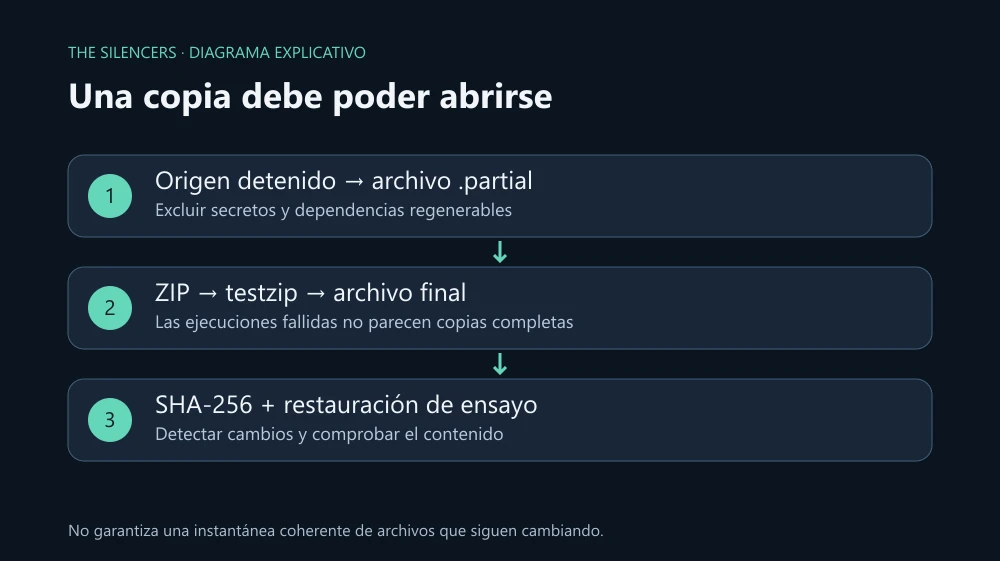
Save this code as backup.py. Omit .git , regenerable dependencies, and .env; review the selection for your project.
import argparse
import hashlib
from datetime import datetime, timezone
from pathlib import Path
from uuid import uuid4
from zipfile import ZipFile, ZIP_DEFLATED

parser = argparse.ArgumentParser(description="Copia ZIP de una carpeta detenida")
parser.add_argument("source", type=Path)
parser.add_argument("destination", type=Path)
args = parser.parse_args()
source = args.source.resolve(strict=True)
destination = args.destination.resolve()
if not source.is_dir():
    parser.error("El origen debe ser una carpeta")
if destination == source or source in destination.parents:
    parser.error("El destino debe quedar fuera del origen")
destination.mkdir(parents=True, exist_ok=True)

stamp = datetime.now(timezone.utc).strftime("%Y%m%dT%H%M%SZ")
final = destination / f"{source.name}-{stamp}-{uuid4().hex[:8]}.zip"
partial = final.with_suffix(".zip.partial")
excluded = {".git", "node_modules", ".venv", "__pycache__"}
count = 0

def walk_error(error):
    raise error

try:
    with ZipFile(partial, "x", compression=ZIP_DEFLATED) as archive:
        for folder, dirs, files in source.walk(on_error=walk_error):
            dirs[:] = [name for name in dirs
                       if name not in excluded and not (folder / name).is_symlink()]
            for name in files:
                path = folder / name
                if path.is_symlink() or name == ".env" or name.startswith(".env."):
                    continue
                if path.is_file():
                    archive.write(path, arcname=path.relative_to(source).as_posix())
                    count += 1
    with ZipFile(partial) as archive:
        damaged = archive.testzip()
        if damaged is not None:
            raise RuntimeError(f"CRC incorrecto: {damaged}")
    partial.replace(final)
    with final.open("rb") as stream:
        digest = hashlib.file_digest(stream, "sha256").hexdigest()
    final.with_suffix(".zip.sha256").write_text(
        f"{digest}  {final.name}\n", encoding="utf-8")
    print(f"{count} archivos: {final}")
    print(f"SHA-256: {digest}")
except Exception:
    if partial.exists():
        partial.unlink()
    raise
The UTC date and random suffix prevent two normal runs from choosing the same name. Mode x requires creating a new file. First .partial is written: until it is closed and passes testzip , it is not renamed to .zip.
Path.walk allows removing folders from dirs before descending. We do not follow symbolic links, nor do we add them as files. This does not replace a security boundary against someone who modifies the paths during execution.
on_error makes the program fail if it cannot traverse a folder: silencing that error would produce an incomplete backup. CRC detects damage inside the ZIP, and SHA-256 allows comparing the complete file afterward. Neither proves that the source was in a coherent state.
Run and rehearse a restore
Example on Windows, with quotes for paths that contain spaces:
py backup.py "C:\proyectos\bot" "D:\copias\bot"On Linux or macOS use python3 backup.py /srv/proyectos/bot /srv/copias/bot. The program prints the number of files, path, and fingerprint. If a permission is missing or the disk fills up, it exits with an error and does not leave the temporary file as a final backup.
Open the ZIP and extract a sample into an empty rehearsal folder. Verify that the relative structure is correct. If you need secrets, retrieve them from your manager or protected copy: this script excludes them and does not encrypt the ZIP. It also does not preserve empty directories or all system permissions and metadata; it is not a complete disk image.
Afterward, you can schedule that same command with Windows Task Scheduler or your server's scheduler. Use absolute paths and the correct interpreter, log the output, and check the return code. Run only one backup of that source at a time. We do not add automatic deletion: decide retention after testing recovery and having another copy off the machine.
A power outage between renaming and writing the fingerprint can leave a ZIP without .sha256. Check it before considering it complete. Another folder on the same disk does not protect against a disk failure; also use an independent destination for irreplaceable data.
Sources and documentation
Project: Python. Developer: Python community and Python Software Foundation. Official download: python.org. License: PSF License and incorporated notices. Original script, banner, and diagram by The Silencers.


Comments 0
Join the conversation with your account.
Sign inLoading comments…