
 @the-silencers0
Build a bot with /dado: the user chooses the number of sides and receives a private roll. The command is registered over HTTP on a test server; a separate process receives interactions via Gateway and responds to them.
Last reviewed: October 2, 2026. Tested locally with: Node.js 24.15.0 and discord.js 14.27.0: imports, command construction, and handler with simulated interactions. No real application was connected to Discord during the review. Use an updated Node.js 24 LTS and keep the indicated discord.js version.
Create a test application
In the Developer Portal create an application, copy its Application ID, and generate a token under Bot. In Installation, enable Guild Install and the scopes bot and applications.commands. Install it on a server you administer; for this exercise, it is enough to allow the bot to view the channel and send messages, without Administrator.
Enable Developer Mode in your Discord client and copy the server ID. Do not confuse Application ID with Guild ID. Leave Interactions Endpoint URL empty: this example receives events via Gateway. A configured HTTP interactions endpoint would change the receiving path.
In a new folder, run:
npm init -y
npm install --save-exact [email protected]
We will use files .mjs so you do not need to change the field type in package.json. Create .env and fill in its values locally:
DISCORD_TOKEN=
CLIENT_ID=
GUILD_ID=
Add .env and node_modules/ to the .gitignore. Never publish the token or the file: whoever obtains it can act as your bot. If you leak it, regenerate the token in the portal and change the process secret. IDs identify resources; they do not replace the token.
Define and register the command
Save commands.mjs:
import { SlashCommandBuilder } from 'discord.js';

export const commands = [
  new SlashCommandBuilder()
    .setName('dado')
    .setDescription('Tira un dado y recibe el resultado en privado')
    .addIntegerOption(option => option
      .setName('caras')
      .setDescription('Entre 2 y 100 caras; por defecto 6')
      .setMinValue(2)
      .setMaxValue(100))
    .toJSON(),
];
The option is an integer and optional. Discord provides a suitable interface for entering it and knows its limits. Save deploy.mjs:
import { REST, Routes } from 'discord.js';
import { commands } from './commands.mjs';

const { DISCORD_TOKEN, CLIENT_ID, GUILD_ID } = process.env;
if (![DISCORD_TOKEN, CLIENT_ID, GUILD_ID].every(Boolean)) {
  throw new Error('Faltan variables de entorno');
}
const rest = new REST({ version: '10' }).setToken(DISCORD_TOKEN);
await rest.put(Routes.applicationGuildCommands(CLIENT_ID, GUILD_ID), {
  body: commands,
});
console.log('Comandos registrados en el servidor de prueba');
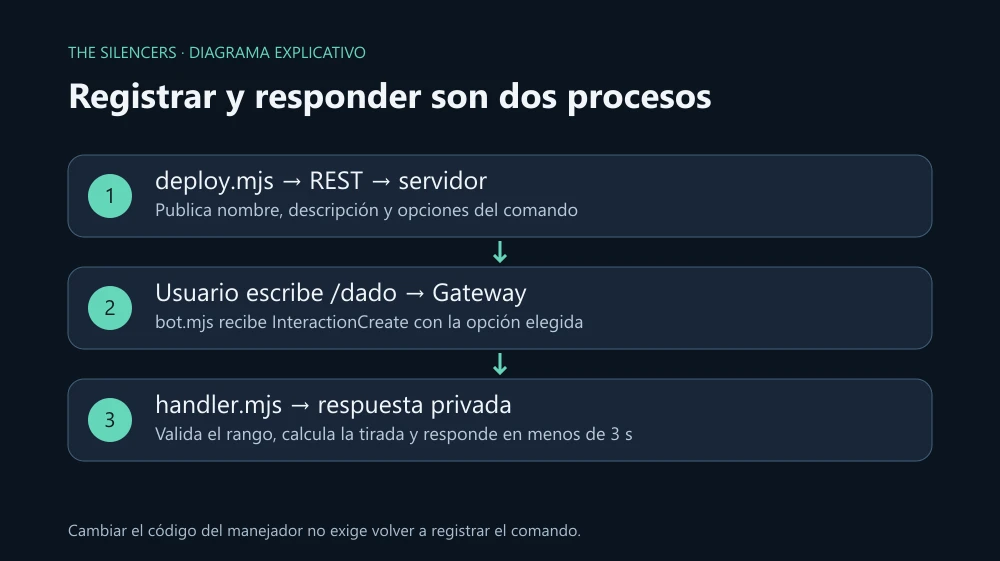
This PUT replaces the command set for this application on that server. Use it with a test application; if you add more commands, all of them must be in the array. Do not run registration on every bot connection. Run it again when you change the definition, not when you only change the logic.
Receive and respond
Save handler.mjs:
import { randomInt } from 'node:crypto';
import { MessageFlags } from 'discord.js';

export async function handle(interaction) {
  if (!interaction.isChatInputCommand() || interaction.commandName !== 'dado') return;
  const faces = interaction.options.getInteger('caras') ?? 6;
  if (!Number.isInteger(faces) || faces < 2 || faces > 100) {
    await interaction.reply({ content: 'Elige entre 2 y 100 caras.', flags: MessageFlags.Ephemeral });
    return;
  }
  const result = randomInt(1, faces + 1);
  await interaction.reply({
    content: `Dado de ${faces} caras: ${result}`,
    flags: MessageFlags.Ephemeral,
    allowedMentions: { parse: [] },
  });
}
randomInt excludes its upper bound; that is why we use faces + 1. Validation also lives in the handler, and the Ephemeral response is only shown to the command caller. Save bot.mjs:
import { Client, Events, GatewayIntentBits } from 'discord.js';
import { handle } from './handler.mjs';

if (!process.env.DISCORD_TOKEN) throw new Error('Falta DISCORD_TOKEN');
const client = new Client({ intents: [GatewayIntentBits.Guilds] });
client.once(Events.ClientReady, ready => console.log(`Conectado: ${ready.user.tag}`));
client.on(Events.InteractionCreate, interaction => {
  handle(interaction).catch(error => console.error('No se pudo responder:', error.code ?? error.name));
});
await client.login(process.env.DISCORD_TOKEN);
We do not need MessageContent or other privileged intents: we do not read messages written in chat. Run first node --env-file=.env deploy.mjs and then node --env-file=.env bot.mjs. On the server, use /dado caras:20; the result must be between 1 and 20. Stop the process with Ctrl+C.
If the command does not appear or does not respond
Check that you registered the correct Guild ID and that you installed the same application whose CLIENT_ID and token you are using. Also review the user's permissions to use application commands in that channel. An invalid token is fixed by regenerating it, not by enabling Administrator.
Discord requires an initial response within three seconds. This calculation responds directly; if you later add a slow query, start with deferReply({ flags: MessageFlags.Ephemeral }) and end with editReply(...). Do not call reply twice on the same interaction. The interaction token has a 15-minute window for follow-up responses; do not use it as a mechanism for long-running tasks.
Sources and documentation
Project: discord.js, discord.js team and contributors. Page and documentation: discord.js.org. Official download: npm, version 14.27.0. License: Apache 2.0. The package and its README, as labeled, declare Node 18+; Node 24 LTS was chosen for this example, without assuming that the development README describes all published versions. Official Node.js, Node.js team, MIT license, and component licenses. Example code and original graphics by The Silencers; the library is not redistributed.

Comments 0
Join the conversation with your account.
Sign inLoading comments…