

 @the-silencers0
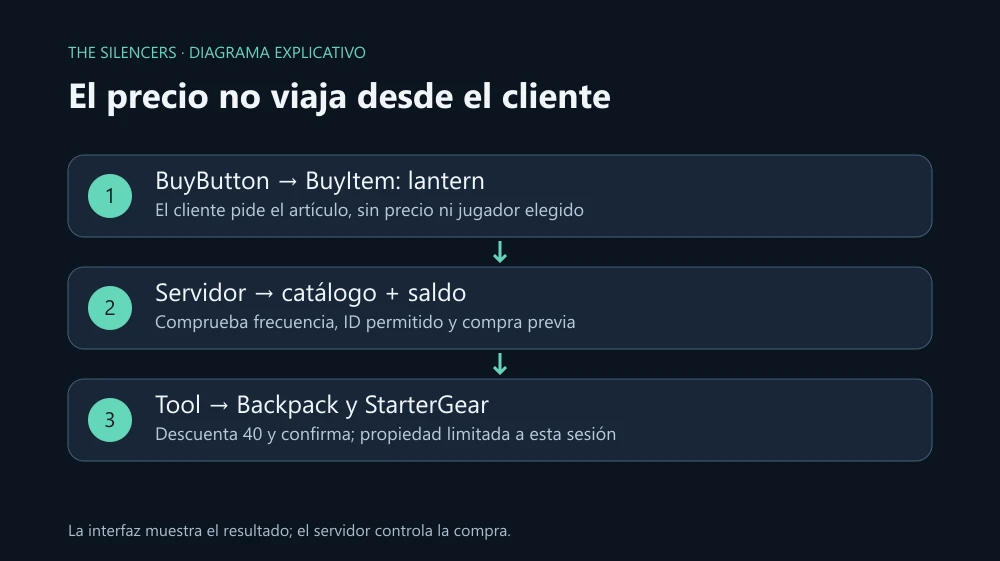
Create a small shop that sells a flashlight for 40 coins. The button sends only the item identifier; the server decides its price, checks the balance, and delivers the tool. This way you can connect an interface to a game action without trusting numbers sent by the client.
Last reviewed: October 2, 2026. Reference: Roblox Studio and current Creator Hub APIs. Code reviewed and syntactically analyzed; not executed in Roblox Studio during this review. Studio updates automatically: no build number is attributed here that has not been verified.
Build the objects in Studio
Install Studio from Roblox Creator Hub and open a Baseplate. Enable Explorer and Properties. You don't need plugins or third-party models.
In ReplicatedStorage create a Folder named ShopRemotes and, inside, two RemoteEvent: BuyItem and PurchaseResult. In ServerStorage create a Folder ShopTools. Inside, add a Tool Linterna that contains a Part named exactly Handle: approximate size 1, 1, 1, Anchored disabled and CanCollide disabled. Add a PointLight inside Handle, with Brightness 2 and Range 16. Keep Archivable enabled on the Tool.
The tool is in ServerStorage so the client cannot obtain it directly from the catalog. Handle is the name that Tool uses to hold it. When equipped, its light will accompany the character.
In StarterGui create a ScreenGui ShopGui, with ResetOnSpawn disabled. Inside, add a TextButton BuyButton, visible, with size 240 by 50 pixels and text “Buy flashlight · 40”. Use for example position X 20, Y 80 so it is not placed under the top bar.
The balance lives on the server
Add a Script ShopServer in ServerScriptService and paste this setup:
local Players = game:GetService("Players")
local ReplicatedStorage = game:GetService("ReplicatedStorage")
local ServerStorage = game:GetService("ServerStorage")
local remotes = ReplicatedStorage:WaitForChild("ShopRemotes")
local buy = remotes:WaitForChild("BuyItem")
local result = remotes:WaitForChild("PurchaseResult")
local tools = ServerStorage:WaitForChild("ShopTools")
local catalog = { lantern = { price = 40, tool = "Linterna" } }
local sessions = {}

local function setup(player)
    if sessions[player] then return end
    local stats = Instance.new("Folder")
    stats.Name = "leaderstats"
    stats.Parent = player
    local coins = Instance.new("IntValue")
    coins.Name = "Coins"
    coins.Value = 100
    coins.Parent = stats
    sessions[player] = { balance = 100, coins = coins, owned = {}, last = -math.huge }
end

Players.PlayerAdded:Connect(setup)
for _, player in Players:GetPlayers() do setup(player) end
Players.PlayerRemoving:Connect(function(player)
    sessions[player] = nil
end)
This example is for an empty experience: if you already have leaderstats or an economy, integrate it with that system instead of creating another. Coins shows the balance, but the rule uses balance in the server table. Players start with 100 per session; DataStore is not used and progress is not saved on exit.
Then add, in the same Script, the purchase processing:
buy.OnServerEvent:Connect(function(player, itemId)
    local state = sessions[player]
    if not state then return end
    local now = os.clock()
    if now - state.last < 0.75 then return end
    state.last = now
    if typeof(itemId) ~= "string" or #itemId > 32 then return end
    local item = catalog[itemId]
    if not item then
        result:FireClient(player, "Artículo no disponible")
        return
    end
    if state.owned[itemId] then
        result:FireClient(player, "Ya tienes esta linterna")
        return
    end
    if state.balance < item.price then
        result:FireClient(player, "No tienes suficientes monedas")
        return
    end
    local template = tools:FindFirstChild(item.tool)
    local backpack = player:FindFirstChildOfClass("Backpack")
    local starterGear = player:FindFirstChild("StarterGear")
    if not template or not template:IsA("Tool") or not template.Archivable
        or not backpack or not starterGear then
        result:FireClient(player, "La tienda no está lista; inténtalo al reaparecer")
        return
    end
    local current = template:Clone()
    local respawnCopy = template:Clone()
    state.balance = state.balance - item.price
    state.coins.Value = state.balance
    state.owned[itemId] = true
    current.Parent = backpack
    respawnCopy.Parent = starterGear
    result:FireClient(player, "Linterna comprada · saldo: " .. state.balance)
end)
OnServerEvent automatically adds the Player who fired the event. We do not ask the client for a player, price, balance, or object to clone. The catalog allows only lantern. The per-player limit slows repeated requests before doing work; a debounce only in the interface would be easy to ignore.
The check and delivery do not contain operations that yield execution, such as a DataStore call. StarterGear keeps the tool in the following respawns of this session. If you leave and return, both the balance and ownership reset. Adding persistence requires designing loading, saving, and error recovery separately.
Connect the button
Inside BuyButton create a LocalScript:
local ReplicatedStorage = game:GetService("ReplicatedStorage")
local remotes = ReplicatedStorage:WaitForChild("ShopRemotes")
local buy = remotes:WaitForChild("BuyItem")
local result = remotes:WaitForChild("PurchaseResult")
local button = script.Parent
local nextClick = 0

button.Activated:Connect(function()
    if os.clock() < nextClick then return end
    nextClick = os.clock() + 0.8
    buy:FireServer("lantern")
end)
result.OnClientEvent:Connect(function(message)
    button.Text = message
end)
Activated works with mouse and touch input. The client cooldown reduces accidental clicks; the server one enforces the rule. Confirmation comes from the server through the second RemoteEvent. Changing the button text or Coins from the client does not modify state.balance.
Test with two players
Select Server & Clients, choose two clients, and start the test. Each one should start with 100 coins. Buy: the balance goes to 60, the flashlight appears in Backpack, and when equipped it lights up. Try to buy again: the balance remains at 60. Respawn and check that it keeps the tool; stop the session and verify that a new test returns to 100.
From the Command Bar of a test client, request an unknown ID:
game:GetService("ReplicatedStorage").ShopRemotes.BuyItem:FireServer("objeto-inexistente")It should not deduct or deliver anything. Also try sending a table: it should be rejected without error. If you see “Infinite yield possible”, check the names and location of the objects. If the button does not act, confirm that it is a LocalScript inside the interface. If it does not equip, check the Part Handle and that it is not anchored.
Sources and documentation
ServerStorage and Tool.
Project and developer: Roblox Studio, Roblox Corporation. Official page and download: Creator Hub. Terms: Roblox terms; Studio is not presented as free software nor redistributed. Store code and original graphics by The Silencers.

Comments 0
Join the conversation with your account.
Sign inLoading comments…