

 @the-silencers0
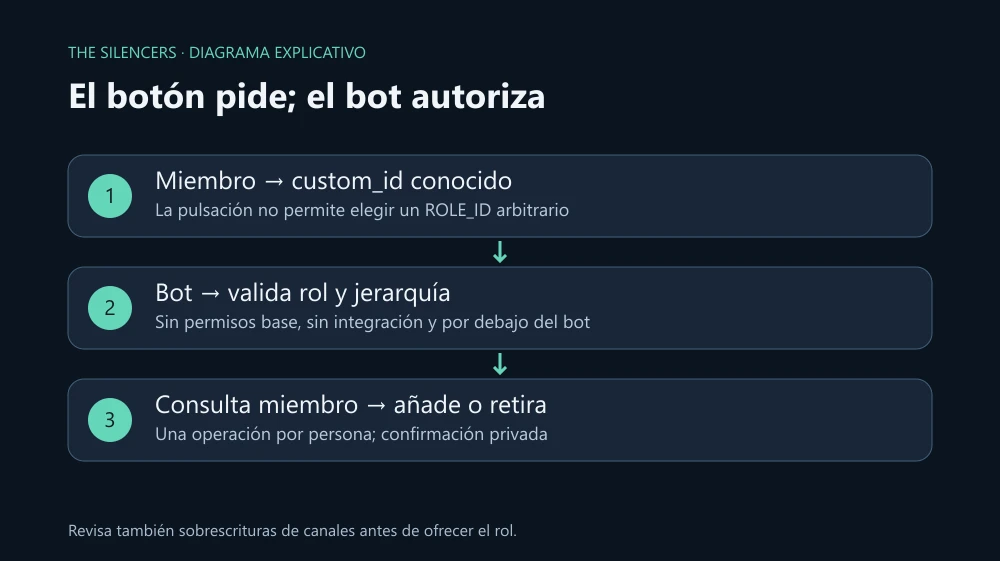
Publish a panel with a button to add or remove a color role. The bot decides on the server which role it can grant: the button never accepts a role ID chosen by the user. The message keeps working after restarting the process because button presses are handled in the global handler.
Last reviewed: October 2, 2026. Tested locally with: Node.js 24.15.0 and discord.js 14.27.0, components, imports, and flow with a simulated server. Actual role assignment requires testing on your Discord server; it was not run against a real account during this review.
Prepare an allowed role
Create your own application in the Developer Portal. Install it with Guild Install and scopes bot and applications.commands. Give it View Channel, Send Messages, and Manage Roles; it does not need Administrator. Leave Interactions Endpoint URL empty, since we will receive interactions via Gateway.
Create a role Comunidad without permissions and drag it below the bot's highest role. This example only accepts a role with no base permissions, one that is not managed by an integration and is not @everyone. Also check that this role does not unlock private channels through overwrites: zero base permissions does not imply zero additional access in all channels.
In a separate folder run npm init -y and npm install --save-exact [email protected]. The files will use the .mjs extension. Fill in this .env with your data; CLIENT_ID is the Application ID and the other IDs are copied using Discord's developer mode:
DISCORD_TOKEN=
CLIENT_ID=
GUILD_ID=
ROLE_ID=
Exclude .env and node_modules/ with .gitignore. Do not publish the token. If it leaks, regenerate it from Bot and update your environment. Use your own test application and server for the registration that follows.
Register the admin panel
Save deploy.mjs:
import { REST, Routes, SlashCommandBuilder, PermissionFlagsBits } from 'discord.js';
const { DISCORD_TOKEN, CLIENT_ID, GUILD_ID } = process.env;
if (![DISCORD_TOKEN, CLIENT_ID, GUILD_ID].every(Boolean)) throw new Error('Falta configurar .env');
const command = new SlashCommandBuilder()
  .setName('panel-rol')
  .setDescription('Publica el botón del rol Comunidad')
  .setDefaultMemberPermissions(PermissionFlagsBits.ManageGuild);
await new REST({ version: '10' }).setToken(DISCORD_TOKEN)
  .put(Routes.applicationGuildCommands(CLIENT_ID, GUILD_ID), { body: [command.toJSON()] });
console.log('Panel registrado');
Registration replaces this application's commands on that server. If you integrate the panel into another bot, gather all its definitions into the same deployment. The default permission limits who can see the command, but we will also check it when it runs.
The button and the server rule
Save handler.mjs. First add the panel construction and the administrator check:
import {
  ActionRowBuilder, ButtonBuilder, ButtonStyle, MessageFlags, PermissionFlagsBits,
} from 'discord.js';
const buttonId = 'silencers:community';
const busy = new Set();

export async function handle(i, config) {
  if (!i.inGuild() || i.guildId !== config.guildId) return;
  if (i.isChatInputCommand() && i.commandName === 'panel-rol') {
    if (!i.memberPermissions?.has(PermissionFlagsBits.ManageGuild)) {
      await i.reply({ content: 'Necesitas Manage Server.', flags: MessageFlags.Ephemeral });
      return;
    }
    const row = new ActionRowBuilder().addComponents(new ButtonBuilder()
      .setCustomId(buttonId).setLabel('Activar / quitar Comunidad').setStyle(ButtonStyle.Primary));
    await i.reply({ content: 'Elige si quieres el rol Comunidad.', components: [row], allowedMentions: { parse: [] } });
    return;
  }
The panel is public; the button confirmation will be private. Continue in the same file, without closing the function yet:
  if (!i.isButton() || i.customId !== buttonId) return;
  const key = `${i.guildId}:${i.user.id}`;
  if (busy.has(key)) {
    await i.reply({ content: 'Tu cambio anterior sigue en curso.', flags: MessageFlags.Ephemeral });
    return;
  }
  busy.add(key);
  try {
    await i.deferReply({ flags: MessageFlags.Ephemeral });
    const role = await i.guild.roles.fetch(config.roleId);
    const bot = await i.guild.members.fetchMe({ force: true });
    if (!role || role.id === i.guildId || role.managed || role.permissions.bitfield !== 0n ||
        !bot.permissions.has(PermissionFlagsBits.ManageRoles) ||
        role.comparePositionTo(bot.roles.highest) >= 0) {
      await i.editReply('El rol no cumple la configuración permitida. Consulta al administrador.');
      return;
    }
    const member = await i.guild.members.fetch({ user: i.user.id, force: true });
    if (member.roles.cache.has(role.id)) {
      await member.roles.remove(role, 'Botón Comunidad solicitado por el miembro');
      await i.editReply('Rol Comunidad retirado.');
    } else {
      await member.roles.add(role, 'Botón Comunidad solicitado por el miembro');
      await i.editReply('Rol Comunidad añadido.');
    }
  } finally {
    busy.delete(key);
  }
}
The specific member is queried via REST to decide with current data. The full member list is not requested, and the privileged GuildMembers intent is not needed for this individual query. Hierarchy is still mandatory even if the bot has Manage Roles. The lock prevents two simultaneous changes by one person within this process; if you run multiple replicas you will need to coordinate it outside memory.
Start the bot
Save bot.mjs:
import { Client, Events, GatewayIntentBits, MessageFlags } from 'discord.js';
import { handle } from './handler.mjs';
const { DISCORD_TOKEN, GUILD_ID, ROLE_ID } = process.env;
if (![DISCORD_TOKEN, GUILD_ID, ROLE_ID].every(Boolean)) throw new Error('Falta configurar .env');
const client = new Client({ intents: [GatewayIntentBits.Guilds] });
client.once(Events.ClientReady, ready => console.log(`Conectado: ${ready.user.tag}`));
client.on(Events.InteractionCreate, async i => {
  try {
    await handle(i, { guildId: GUILD_ID, roleId: ROLE_ID });
  } catch (error) {
    console.error('Cambio fallido:', error.code ?? error.name);
    try {
      if (i.deferred) await i.editReply('No se pudo completar el cambio. Revisa permisos y jerarquía.');
      else if (!i.replied) await i.reply({ content: 'No se pudo completar la acción.', flags: MessageFlags.Ephemeral });
    } catch { /* La interacción puede haber caducado. */ }
  }
});
await client.login(DISCORD_TOKEN);
Run node --env-file=.env deploy.mjs once and then node --env-file=.env bot.mjs. An administrator uses /panel-rol. Test the button with a regular member: the first press should add the role and the second should remove it. Restart the bot and press the previous message; it will keep working because it does not depend on a temporary collector.
If Missing Permissions appears, check Manage Roles and the position of both roles. If the role was changed to give it permissions, this example will deliberately reject it. If Discord shows "The application did not respond," check that the process is connected and reaches deferReply within three seconds. Do not delete the panel to try to fix a hierarchy error.
Sources and documentation
Project and developer: discord.js, discord.js team and contributors. Site and documentation: discord.js.org. Official download: npm 14.27.0. License: Apache 2.0. Node.js, Node.js team, MIT license and component licenses. The examples and graphics are original from The Silencers; no libraries or tokens are attached.

Comments 0
Join the conversation with your account.
Sign inLoading comments…